How to use Licowa -Photobooth & Wallpaper App
Do you want to create beautiful photo booth pictures, stylish photo collages, and attractive mobile wallpapers using your own photos? If yes, Licowa – PhotoBooth & Wallpaper is an interesting Android application you can try.Licowa is an all-in-one photo editing and personalization app that allows you to create photo strips, customize wallpapers, edit pictures, add stickers, and make creative photo collages. It also provides AI-powered editing tools to make your pictures more creative.In this article, we will explain what Licowa is, its main features, how to download it, and how to use it step by step.
What Is Licowa – PhotoBooth & Wallpaper App?
Licowa is a photo editing and wallpaper customization application developed by Shining Ai Inc.The app combines different creative tools in one place. You can use it to create photo booth-style pictures, design personalized wallpapers, make collages, and apply different filters and effects.One of its interesting features is Photo Booth, which can capture four consecutive pictures and automatically combine them into a classic photo strip.You can also use its DIY Wallpaper feature to create personalized backgrounds using photos, stickers, frames, layouts, and other creative elements.
Main Features of Licowa App
Let’s understand some of the important features available in Licowa.
1. Photo Booth Feature
The Photo Booth feature allows you to create traditional photo booth-style pictures using your smartphone camera.You can capture multiple pictures and combine them into a single photo strip. The app also provides different templates, stickers, and filters to customize your pictures.
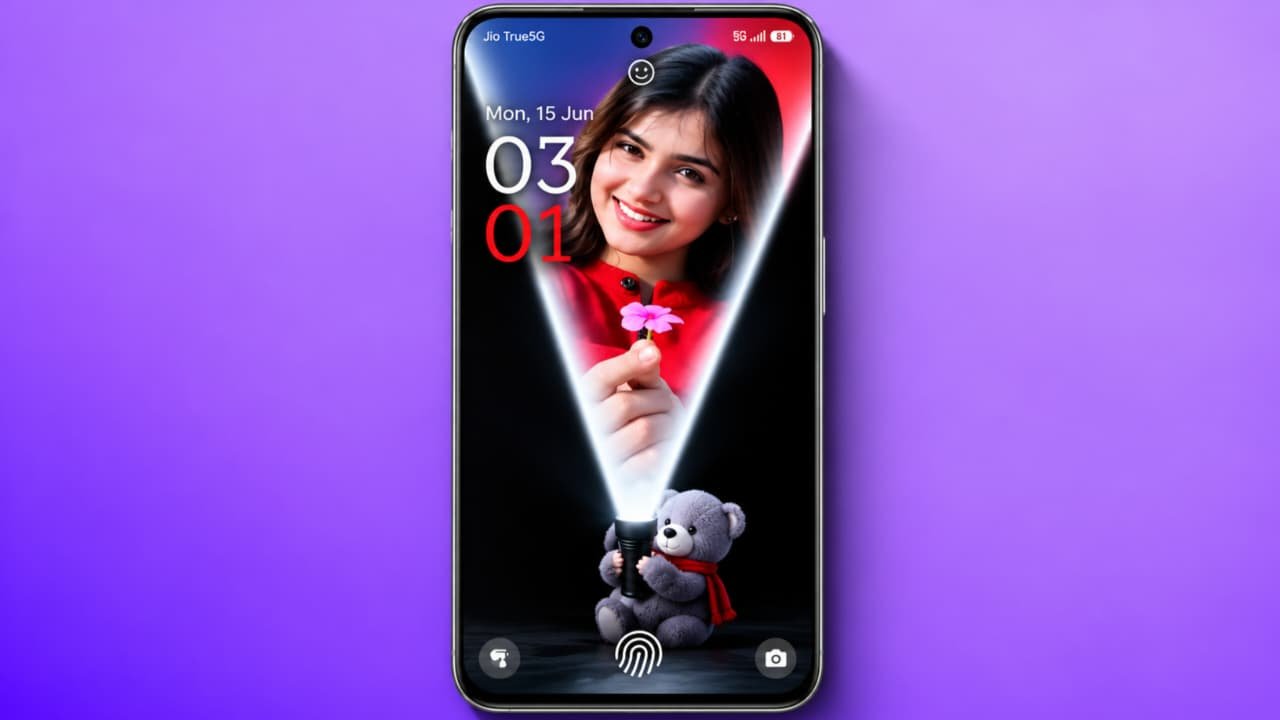
2. DIY Live Wallpaper
This is another interesting feature of Licowa.You can select your favorite pictures and turn them into personalized wallpapers. The app provides different effects, frames, backgrounds, patterns, and layouts.You can create attractive backgrounds for your smartphone’s home screen and lock screen.
3. AI Photo Editing
Licowa includes several AI-powered editing tools.
Some of its editing features include:
- AI Object Removal
- AI Background Removal
- AI Image Enhancer
- AI Style Transfer
- AI Portrait Editing
- One-Tap AI Cutout
These tools help you create different styles of pictures without needing professional photo editing knowledge.
4. Photo Collage Maker
With the collage feature, you can combine multiple pictures into one design.You can select different layouts, grids, frames, backgrounds, and stickers to create your own photo collage.
5. Stickers and Filters
Licowa offers different stickers, filters, and decorative elements.You can add stickers to your pictures, apply different effects, and customize your designs according to your preferences.
6. Video Collage
The app also provides video collage editing options.You can combine supported photos and videos into creative visual designs and slideshows.
7. Text and Font Customization
You can add text to your pictures and collages.The app provides different fonts and text customization options, including curved text, to make your designs more attractive.
How to Download Licowa App on Android
If you want to use Licowa on your smartphone, follow these steps:
- First, unlock your Android smartphone.
- Open the Google Play Store.
- Tap the search bar.
- Type Licowa – PhotoBooth & Wallpaper.
- Find the application developed by Shining Ai Inc.
- Check the application details.
- Tap the Install button.
- Wait for the installation to finish.
- Open the Licowa application.
You can also find the official application through the Google Play Store link below.
How to Use Licowa Photo Booth
Now let’s learn how to create photo booth pictures using Licowa.
- Open the Licowa application.
- Find and select the Photo Booth option.
- Explore the available photo booth templates.
- Select your favorite layout.
- Choose a suitable photo booth background.
- Allow camera access if required.
- Position your phone and get ready for the pictures.
- Tap the capture button.
- The app can capture four consecutive photos automatically.
- After capturing, tap Done.
- Apply your favorite filters, stickers, and effects.
- Tap Save to export your finished photo.
Your photo booth-style picture will be saved to your phone’s gallery.
How to Create Live Wallpaper Using Licowa
You can also create personalized wallpapers using this application.Follow these steps:
- Open the Licowa app.
- Select the DIY Wallpaper or Live Wallpaper section.
- Browse the available wallpaper templates.
- Select a design you like.
- Choose a photo from your gallery if required.
- Add different stickers, frames, and effects.
- Adjust the photo layout.
- Preview your wallpaper.
- Tap Save or Apply.
- Follow the on-screen instructions to set your wallpaper.
Depending on the selected feature and Android device, the available wallpaper options may differ.
How to Create a Photo Collage Using Licowa
If you want to combine multiple pictures into one image, you can use the collage maker.
- Open Licowa on your smartphone.
- Select the Photo Collage option.
- Choose multiple pictures from your gallery.
- Select your preferred collage layout.
- Adjust the position and size of each picture.
- Add stickers, backgrounds, and text.
- Apply your favorite filters.
- Preview your final design.
- Tap Save to store the collage.
Now you can share your creative collage with friends or on social media.
How to Edit Photos Using AI Tools
Licowa also provides AI editing options.
- Open the application.
- Select the AI Editing section.
- Choose a picture from your gallery.
- Select the editing tool you want to use.
- Try AI Object Removal to remove unwanted objects.
- Use AI Cutout to separate a subject from its background.
- Apply AI Style Transfer to explore different artistic styles.
- Use Image Enhancer to improve image clarity.
- Preview your edited picture.
- Save the final result.
Some AI features may have usage limits or additional requirements depending on the app version.
Is Licowa App Free?
Licowa is free to download and provides several basic creative features, including photo booth, collage creation, and wallpaper customization.However, some premium templates, exclusive designs, and additional features may require a subscription or in-app purchase. Check the current pricing before purchasing anything.